Overview
The ckanext-permissions extension is an open-source CKAN extension being produced by DataShades, a community brand of Link Digital. It provides data portal administrators with a visual, auditable interface to manage user permissions across a CKAN portal. Administrators can define custom roles and configure granular permissions without needing to write custom code.
The extension is currently under active development and is not yet recommended for production environments, but CKAN users can try the beta version and provide feedback to developers.
The problem it solves
CKAN’s default access control model relies on a fixed set of roles: anonymous visitors, logged-in users, collaborators, organisation members, editors, administrators, and system administrators. But organisations frequently require more flexible access rules, such as moderators who edit datasets without administrative rights, staff-only portals, or dedicated reviewers for a particular dataset publication.
Previously, implementing these workflows required bespoke code for each portal, but ckanext-permissions standardises custom access control as a single, reusable, UI-configurable extension.
Key features
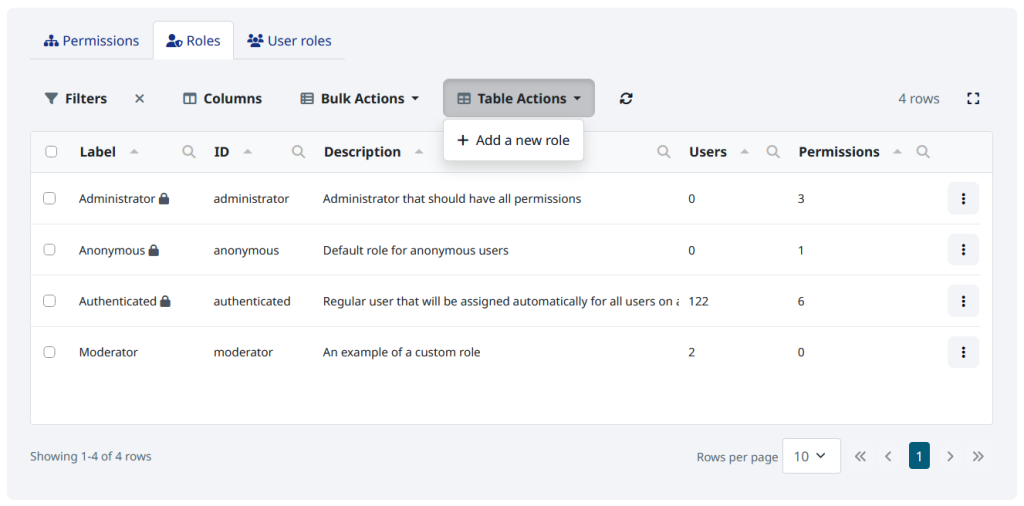
Custom Roles
- A role can apply across the whole portal or within a single organisation only.
- Three built-in roles: anonymous (any visitor), authenticated (any logged-in user) and administrator.
- An administrator can create any number of their own roles, such as moderator, reviewer or internal staff, directly in the web interface.
Simple permission control
- Changes take effect immediately and you can grant or revoke access straightaway.
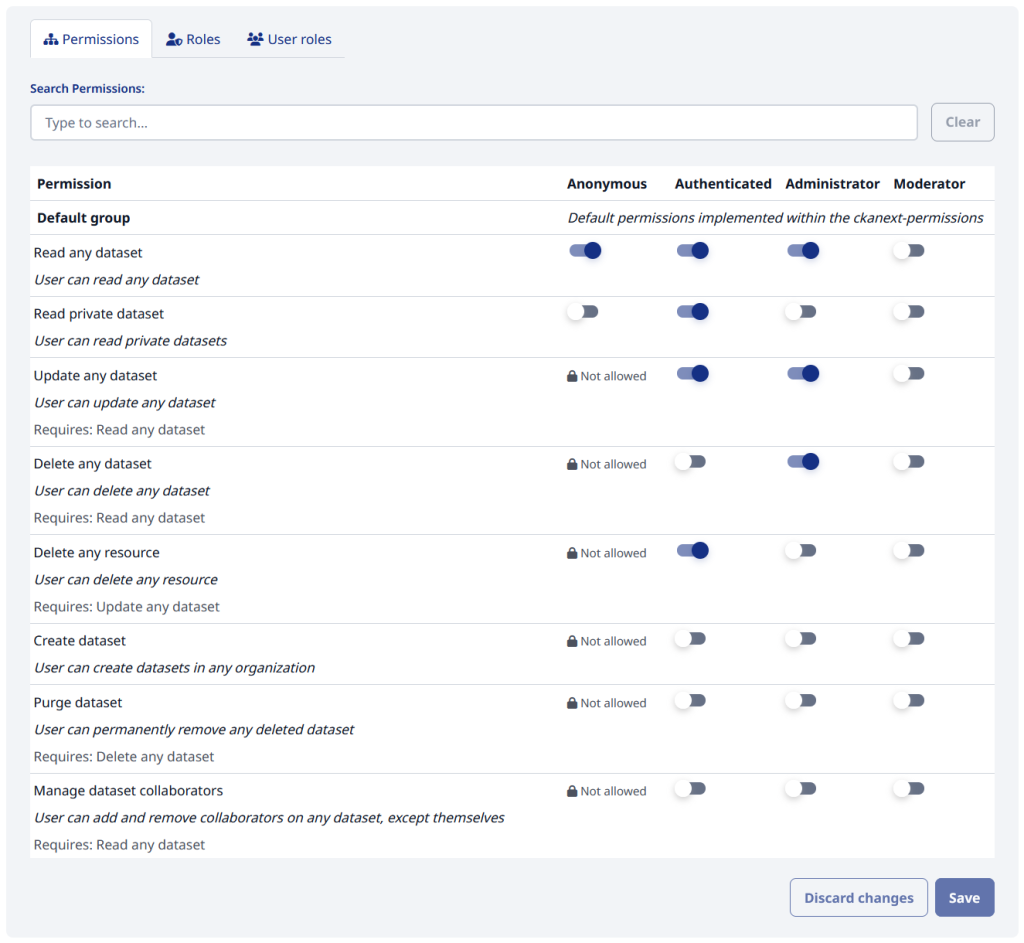
- An administrator panel shows a clear table of roles and permissions with on/off switches, search and helpful tooltips.
- It includes ready-made permissions for common tasks, such as viewing private datasets, editing or deleting datasets and resources, creating datasets, managing organisation members and groups, and more.
Smart and safe by design
- Users can’t raise their own access level.
- Sensitive permissions can never be given to anonymous visitors.
- The extension only adds access on top of CKAN’s standard rules. It never silently removes it.
- Built-in dependencies: permissions that rely on each other are handled automatically. For example, you can’t edit a dataset you aren’t allowed to see.
Full audit trail
- The log can’t be deleted from the web interface to ensure maximum transparency and accountability.
- Every change to roles and permissions is logged, including who made it, roles created or deleted, permissions granted or revoked, and roles assigned or removed.
Easy transfer between environments
- Changes are highlighted for review before they are saved. There’s no need to re-tick dozens of checkboxes by hand.
- Export the full permission setup as a file and import it into another portal. For example, from a test site to the live site.
Developer-friendly extensibility
- Other CKAN extensions can add their own permissions, such as “review dataset” or “approve dataset”, with a short configuration file and one line of code.
- Administrators then switch these permissions on or off in the interface, with no further development.
- Command-line tools are provided for portal maintainers, including export, import, role sync and log clean-up.
Benefits to users
- Complex organisations: Assign tailored permissions to specific departments or partner organisations.
- Clients: Accelerate Delivery schedules and reduce costs with transparent, easily readable permission structures.
- IT & DevOps teams: Export and sync permissions reliably across development, testing, and production environments.
- Portal owners and data managers: You can directly manage portal access via an intuitive web user interface without filing developer requests.
- Governance and security teams: Maintain an immutable audit trail, prevent privilege escalation, and enforce secure defaults for anonymous users.
- CKAN Developers: Leverage a reusable permissions engine instead of writing custom access logic for every deployment.
Technical Facts
- Compatible with CKAN 2.11 and later -CKAN 2.10 and older are not supported
- Open source, AGPL-3.0 license
- Developed and maintained by DataShades/Link Digital
- Repository: https://github.com/DataShades/ckanext-permissions
- Package: https://pypi.org/project/ckanext-permissions/ (latest release 0.4.0)
Planning a CKAN data portal for your organisation? Get in touch with us and one of our experts will be in contact.